
Start a new agent
Use the New Agent sheet to start a coding agent or a plain shell on any Host, in an existing Workspace or a new folder.
The New Agent sheet starts a coding agent, or a plain shell, on one of your Hosts. Pick the Host, where it should run, and which agent, then tap Start. Waycar opens the new agent’s terminal as soon as it is running.
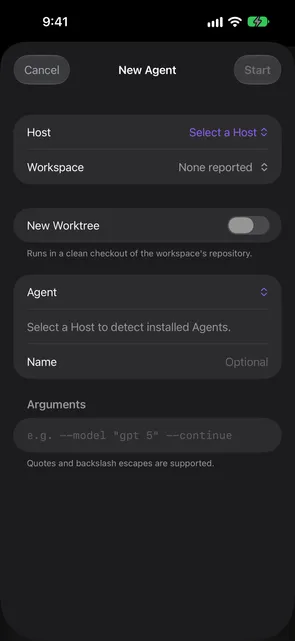
Open the New Agent sheet
- In the Console, tap the round + button in the bottom bar.
- On iPad with a keyboard, press ⌘N.
- From an agent you have open, choose New Agent in its More menu. The new agent starts in a new tab next to the one you opened it from, in the same folder.
Start an agent
- Pick a Host. Waycar looks for the agent tools installed on it and shows “Detecting installed Agents…” while it checks.
- Pick a Workspace: an existing one, or New Workspace to start a fresh Workspace in a folder on the Host. See Start in a new folder.
- Pick the Agent. Leave Name empty to use the default name. As you type a Name, Waycar turns spaces and symbols into
-and makes it lowercase. A Default Shell’s name is left as you type it. - Add Arguments if the agent needs any. Quotes and backslash escapes are supported.
- Tap Start.
To give the agent its own git checkout instead, turn on New Worktree. See Start on a new worktree. To open it as a chat instead of a terminal, turn on Chat Mode. See Chat Mode.
The sheet remembers the Host and the Agent you picked last, the last Workspace you used on each Host, and whether Chat Mode was on.
Start in a new folder
- In Workspace, choose New Workspace.
- The folder is your home folder until you change it. Tap Change Directory… to open Browse Directories.
- Tap folders to go down, or the parent-folder button to go up. Type in Filter folders to narrow a long list.
- Tap Select to use the folder you’re in.
- Type a Name for the Workspace, or leave it empty to use the folder’s name.
On a Host with both herdr and tmux, a Start In switch picks herdr or tmux for this Workspace. It starts at the Host’s default and isn’t remembered. On tmux, the new Workspace is a new tmux session.
If a folder has no subfolders, the browser says No Subfolders and you can still select it. If the list can’t load, you see Couldn’t Load Folders; tap Try Again.
Name rules
Agent names are 1 to 32 characters: lowercase letters, digits, - or _, starting with a lowercase letter. When a name doesn’t fit, the rule shows under the field. A name copied from a worktree Branch also drops leading characters that aren’t letters, so 97-fix-login becomes fix-login. For Default Shell, Name is the shell’s tab label and any text is accepted.
Start a plain shell
Choose Default Shell in the Agent picker. It opens a plain terminal running the Host’s default shell, with no AI agent, the same shell an SSH login lands in. In an existing Workspace it opens where that Workspace’s focused pane is. Default Shell and New Terminal panes carry WAYCAR_SHELL=1 in their environment, so a shell startup file that launches an agent on its own can skip that step.
Watch the launch
After you tap Start, a status line under the sheet’s title shows what the launch is doing, such as “Creating the workspace” or “Opening the agent”. A slow step shows how many seconds it has taken. If the launch fails, the reason shows there. Tap Start to try again.
If you send a message while the agent is still starting, Waycar types it into the agent’s terminal without pressing Enter. Check it, then press Enter from the Toolbar to send it. A message with more than one line, or an agent waiting on a question such as Claude Code’s folder-trust prompt, makes the send fail instead: answer the question in the terminal and send again.
Good to know
- Each agent or shell you start from the phone is one Launch. Waycar is free with 10 Launches in any 30 days; Waycar Pro removes the limit.
- If no agent is found on the Host, the sheet shows No Agents Found. Install a supported agent tool on the Host and tap Detect Again, or choose Default Shell.
- See Supported agents for the list Waycar can start.
Still stuck?
Waycar Support covers common problems and how to reach us by email.