
Chat Mode
Talk to Claude Code, Codex, omp, pi or opencode as a simple chat instead of a terminal, with replies in your notifications.
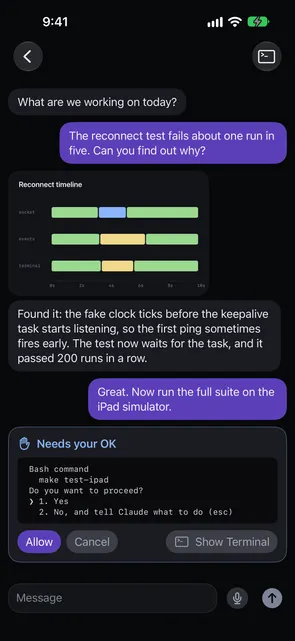
Chat Mode opens an agent as a simple chat instead of a terminal. You see your messages, the agent’s final reply to each one, and a status line that says what it is doing. It works with Claude Code, Codex, omp, pi and opencode.
Start a chat
- Run the install command on the Host first, so it has the latest Waycar plugin:
curl -fsSL https://waycar.dev/install.sh | sh - Open New Agent, pick Claude Code, Codex, omp, pi or opencode, and turn on Chat Mode.
- Tap Start. A greeting opens the chat, and you type your first message. Waycar writes the greeting on your device; it is never sent to the agent.
To start a chat from the Home Screen in one step, see New Chat from the Home Screen.
opencode needs one more step
On herdr, run this on the Host once:
herdr integration install opencodeOn herdr and tmux alike, opencode gets the Chat Prompt only through a small Waycar extension that the install command adds when opencode is already installed. So install opencode first, then run the Waycar install command. If you installed opencode after Waycar, or ran the install command with --no-hooks, run the install command again without it. Otherwise replies don’t follow the Chat Prompt.
Talk to the agent
Type in the Message field and tap Send. With a hardware keyboard, Return sends and Shift+Return starts a new line. On iPhone without one, Return starts a new line. The microphone lets you dictate instead.
When the agent needs your OK, a Needs your OK card shows the prompt from the agent’s screen. It reads “Reading the prompt…” while Waycar reads the screen, and Allow and Cancel stay off until it has. If it shows “Couldn’t read the prompt”, tap Retry. Allow sends Return to the agent and Cancel sends Esc. For anything else, tap Show Terminal to see the agent’s real terminal.
If a turn ends without any final text, the reply reads No reply.
Images, videos and files
Images the agent opens during a turn show above its reply, and so do images and videos the reply names, whether a file on the Host or an https link. Tap one to view it full screen. A file the agent attaches opens as text unless it is an image, a PDF, or a video or audio file.
Videos, files the agent attaches, and anything from an https link don’t load until you tap them (“Tap to load from …”). Loading web media shows your phone’s IP address to that site.
The chat has no attach control. To send a photo or file, tap Show Terminal, add it in the Composer there, and come back. The Composer’s tray is shared with the chat.
Replies in your notifications
When the agent finishes, the notification and the in-app banner show its reply itself, or the error when a turn fails without one. For now this works on herdr Hosts, not tmux.
Chat Mode settings
In Settings › Chat Mode:
- Chat Prompt: the prompt Chat Mode agents get at launch so their replies read like texts. Edit it, or tap Reset to Default. It can be up to 8,000 characters. Line breaks are sent as spaces. Running chats keep the prompt they started with.
- Model: the model each agent starts with. Leave it blank for the agent’s own default. A model in New Agent’s Arguments wins. opencode models are written
provider/model. - Quick thinking: on by default. It asks for less reasoning so replies come back faster. Turn it off for harder questions. It doesn’t apply to opencode.
- New Chat: the Host, Workspace and Agent for New Chat.
herdr and tmux
Chat Mode works on both. On tmux, Allow and Cancel, and opencode chats, need the Waycar hooks the install command adds. Replies in notifications are herdr only for now.
Good to know
- A chat badge marks Chat Mode agents and closed chats in the Console, and the Chat filter lists only them.
- A chat started on one device opens as a chat on your others.
- If herdr restarts, the chat stays a chat, but the agent comes back without the Chat Prompt, so replies may run longer until you start it again in Chat Mode.
Something not working? See Chat Mode won’t start or send.
Still stuck?
Waycar Support covers common problems and how to reach us by email.