NEWNative for iPhone & iPad · works with herdr and tmux · Android coming soon

Your agents stay attached.
Over mosh, and SSH.

  • survives network changes
  • catches up after dead zones
  • falls back to SSH on its own
  • no account
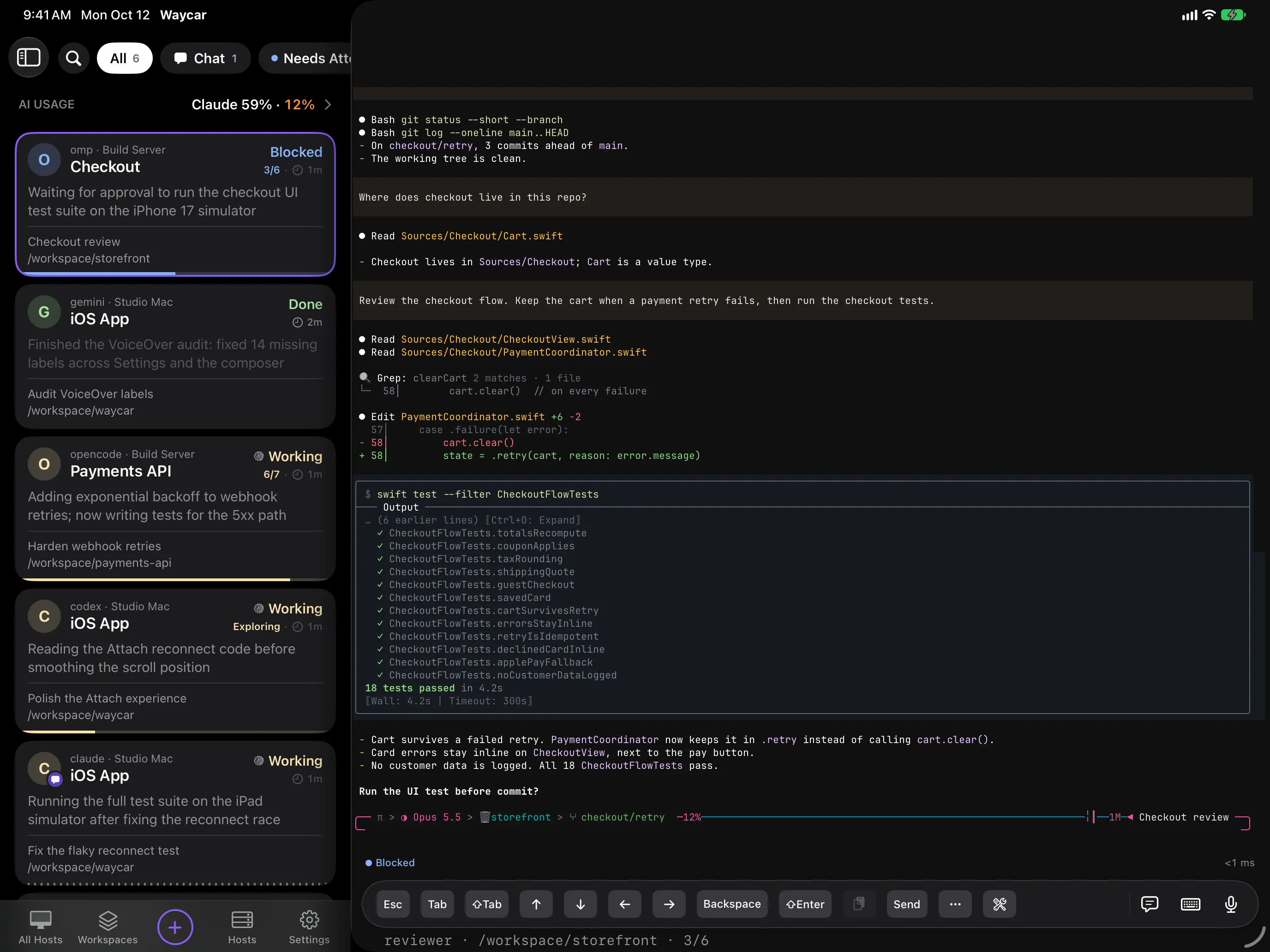
Agent Console sidebar on iPad, with the AI Usage row on top, next to the selected agent's live terminal and its Toolbar
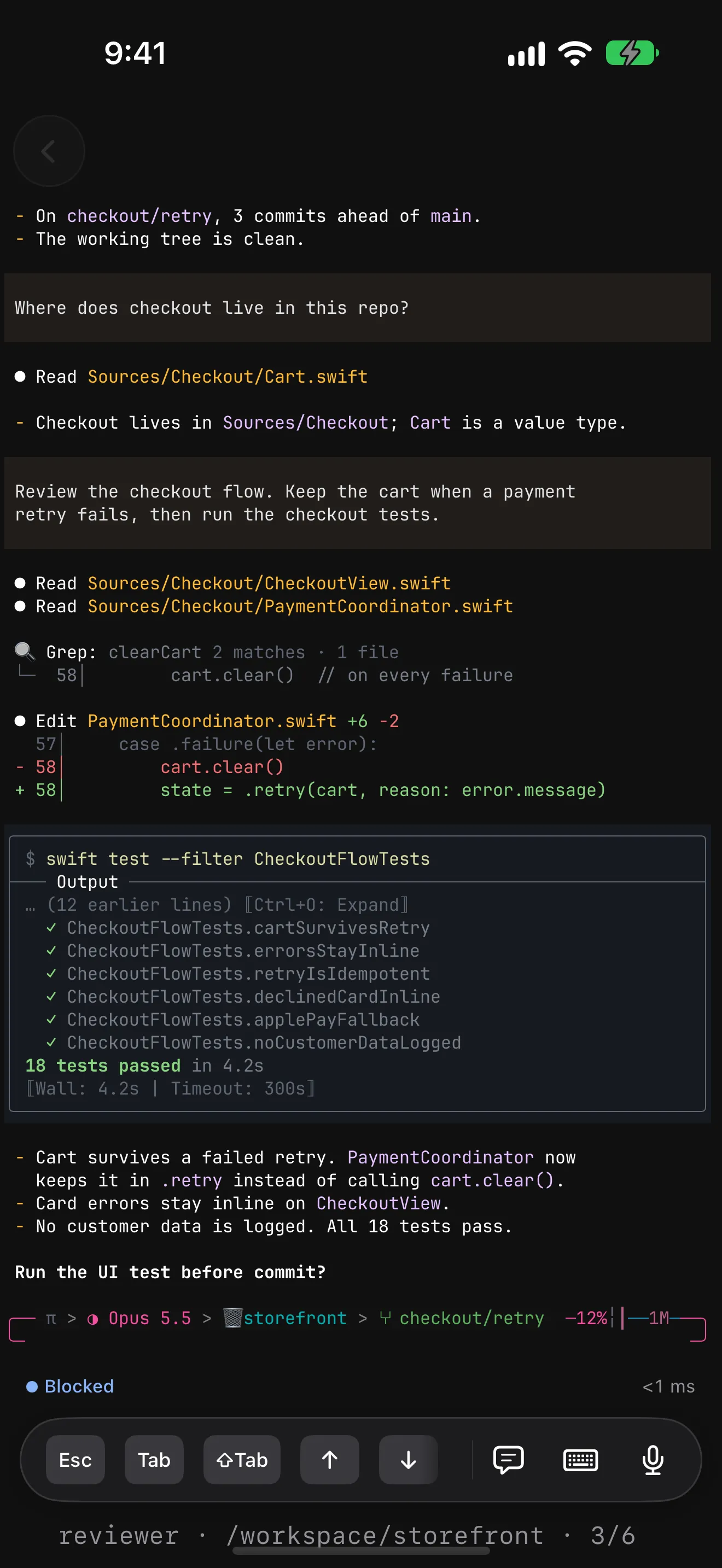
An agent's live terminal on iPhone waiting on a question, with the Toolbar below: Esc, Tab, ⇧Tab and arrow keys, then Message, keyboard, and mic buttons
Get Waycar

Get Waycar

  • iPhone and iPad

    Show QR codeHide QR code
    Scan with your iPhone or iPad
  • Android™,

    Coming soon

Close

Then run this on your Mac or Linux box:

install Waycar on your Host
Command to install Waycar for herdr or tmux
curl -fsSL https://waycar.dev/install.sh | sh

watchesclaudecodexompgeminiopencodepi+ more

mosh vs SSH

SSH drops when your phone moves. mosh keeps going.

SSH is tied to one network. mosh keeps your session on your machine and syncs it to your phone as you change networks.

When the phone switches from Wi-Fi to cellular, the SSH terminal drops and reconnects while the mosh terminal keeps streaming.
  • Roams

    Wi-Fi to cellular, same session. No reconnect.

  • Catches up at once

    After a dead zone you see the live screen, not a replay of every byte.

  • Falls back

    No UDP? Waycar switches to SSH on its own. A MOSH or SSH badge shows which.

  • Quick return

    Come back and pick up where you left off.

Needs mosh-server and open UDP on your machine. Tap Test Mosh to check.

Chat Mode

Skip the terminal. Just talk to your agent.

Claude Code, Codex, omp, pi and opencode, as a simple chat.

  • Replies in your notifications

    Read the reply without opening the app. herdr only, for now.

  • Allow or Cancel, right there

    Answer permission prompts in the chat. The terminal is one tap away.

  • See what it sees

    Images and videos appear above the reply.

  • New Chat from the Home Screen

    Touch and hold the Waycar icon, then tap New Chat.

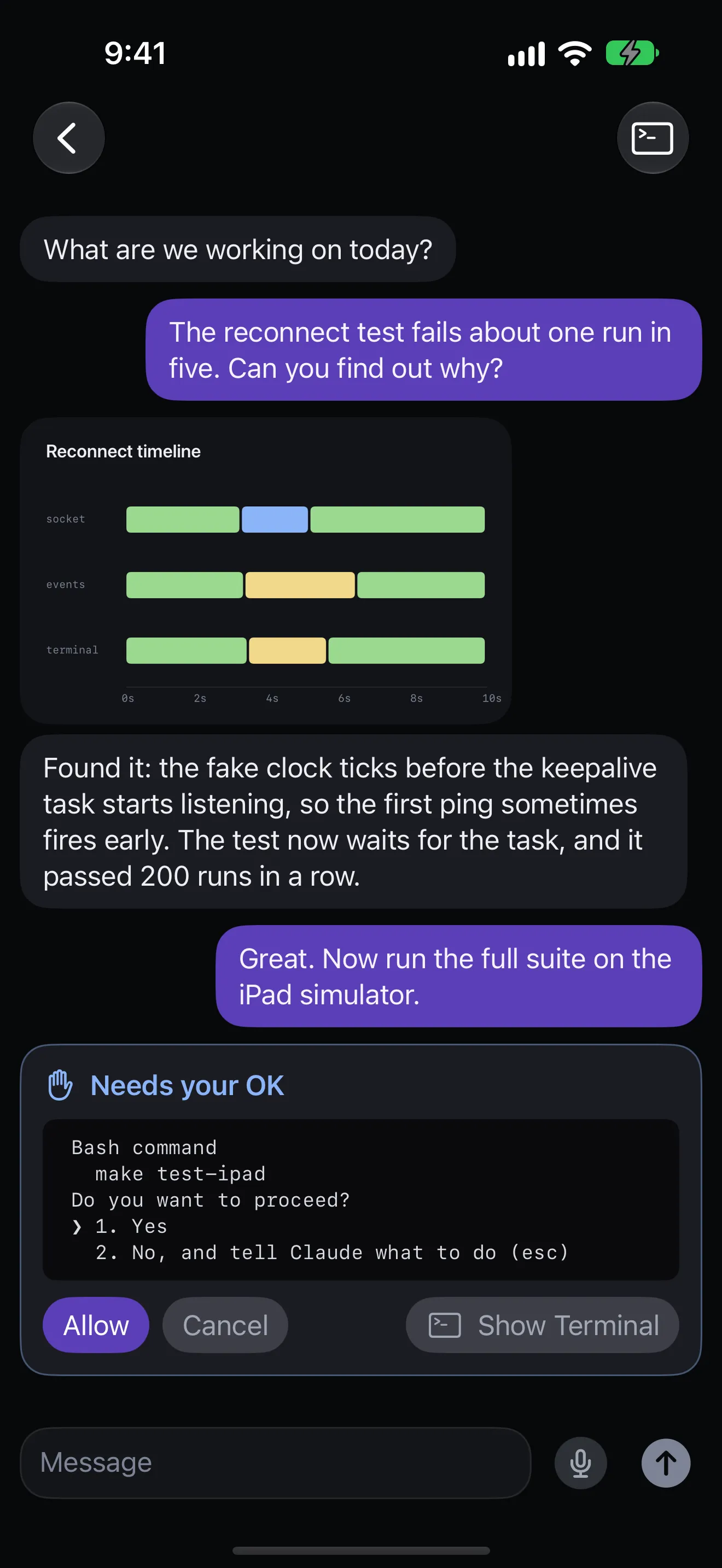
An agent in Chat Mode on iPhone: you ask why a reconnect test fails, it shows a Reconnect timeline chart and explains the fix, then asks your OK to run the tests with Allow, Cancel, and Show Terminal buttons. At the bottom is the Message field with a mic button
AI Usage · via CodexBar

Know which account runs dry. Before your agent does.

With CodexBar on a Host, the Console shows the provider closest to its limit.

① Glance
The AI Usage row at the top of the Agent list on iPhone, reading Claude 59% · 12%

Percent left this session and this week.

② Tap for every gauge
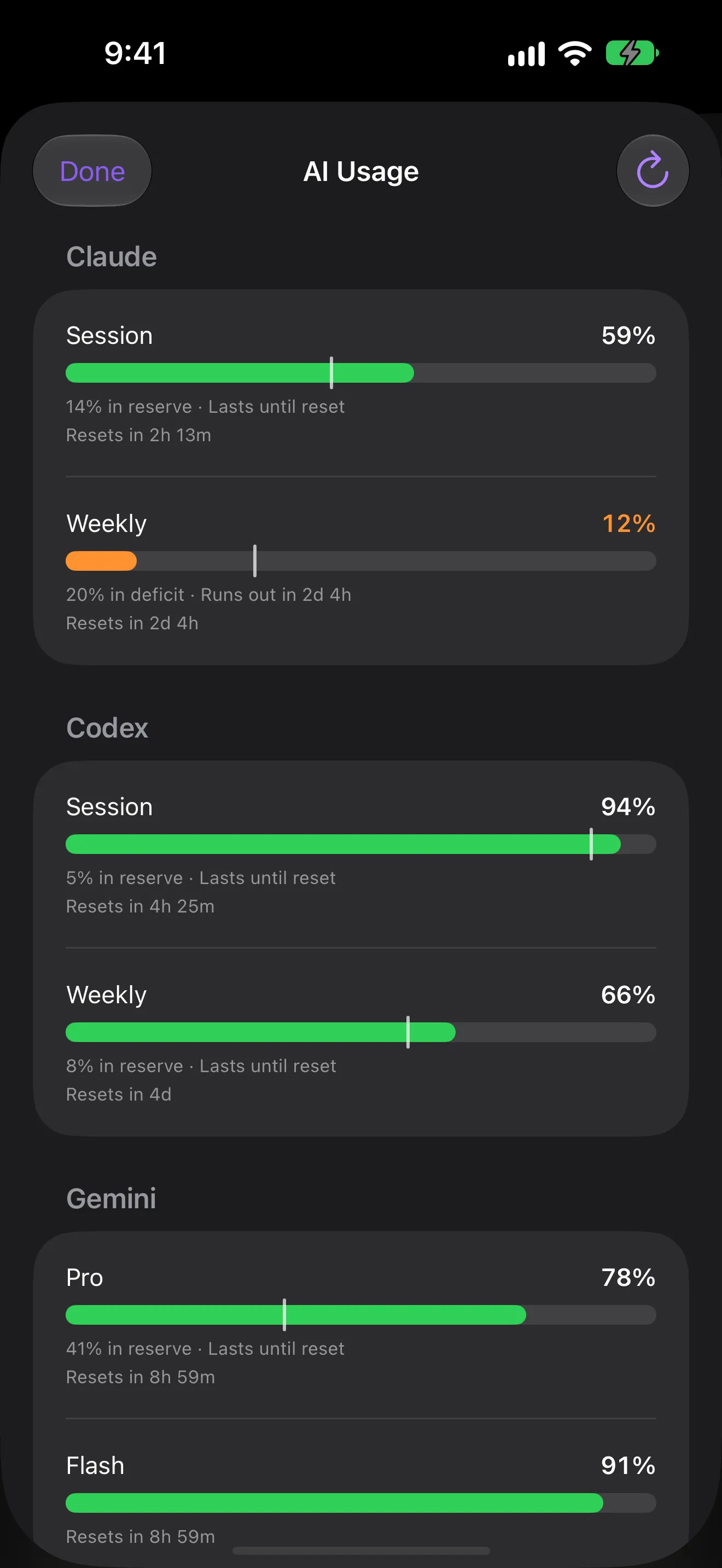
AI Usage sheet on iPhone with session and weekly gauges for Claude and Codex, Pro and Flash gauges for Gemini, each with a pace line and reset time. Claude has 59% of its session left, and its weekly gauge is amber at 12% left and on pace to run out in 2 days

Every provider, lowest first

Session and weekly gauges, pace, and reset times.

Runs on your Host

Read over SSH every few minutes while the app is open.

Entirely optional

Turn it on or off for each Host.

Closed Sessions

Quit by accident?
Pick up where you left off.

Ended agents stay for 30 days. Two taps bring one back.

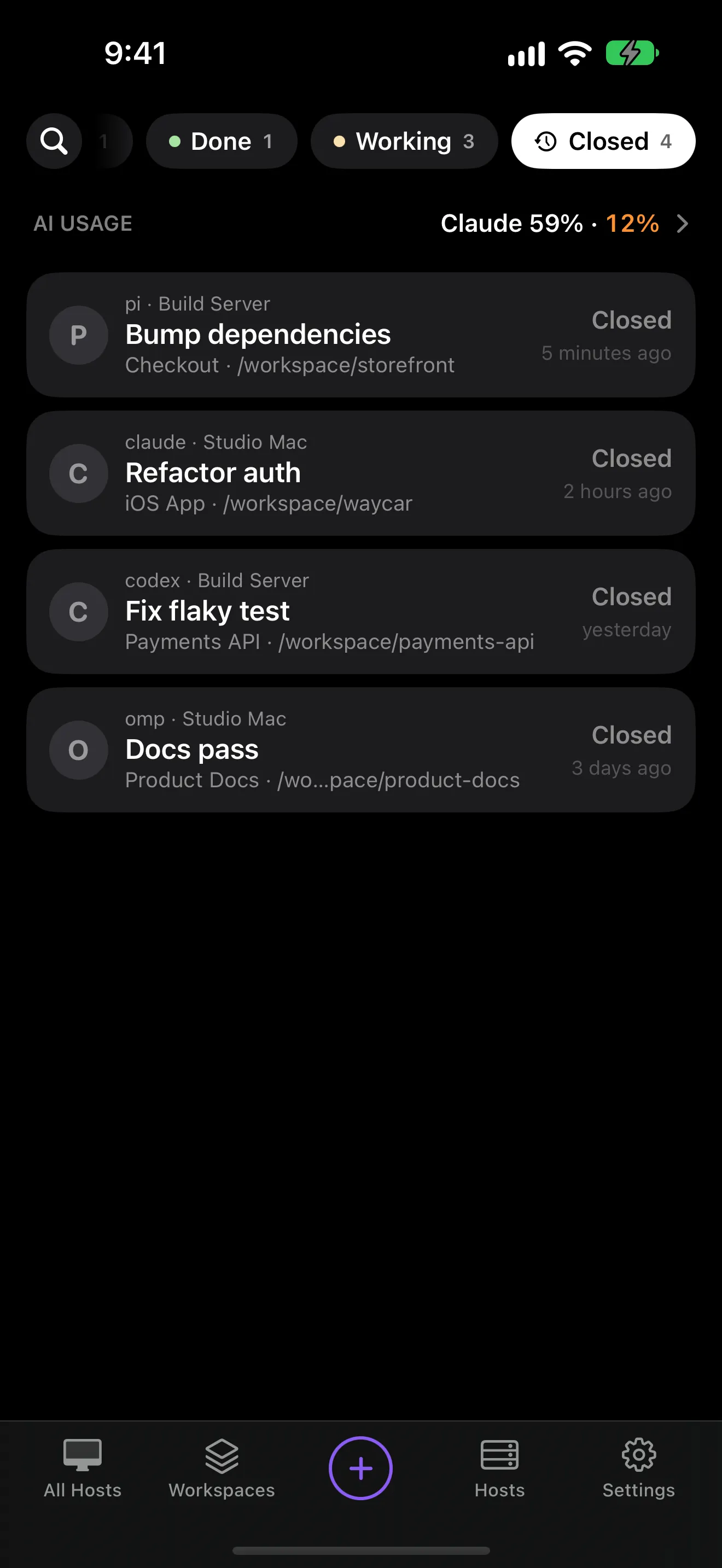
  1. Tap Closed

    Ended agents, newest first. Search works too.

  2. Tap one

    It reopens in a new tab, in the same folder.

  3. You're back

    Most agents resume the same chat.

The Console on iPhone with the Closed filter on, listing four closed agents from two Hosts

Opened the wrong one?

Back out without typing and it closes again.

On iPhone and iPad

With iCloud Sync, closed agents show up on both.

Out of your way

Off your main list. Swipe to forget one sooner.

tmux

Already on tmux? Keep it.

tmux 3.2 or later works too, with the same install command. Run both? One list.

What Waycar can do with herdr versus tmux
Featureherdrtmux
Agent listWorkspaces, tabs and panesSessions, windows and panes
Agent statusEvery agent herdr knowsClaude Code, Codex, omp, pi and opencode, via Waycar hooks
Alerts and Live ActivitiesYesVia Waycar hooks
Chat Mode replies in alertsYesNot yet
Everything elseYesYes, a few parts via Waycar hooks
  • Agent list

    herdrWorkspaces, tabs and panes

    tmuxSessions, windows and panes

  • Agent status

    herdrEvery agent herdr knows

    tmuxClaude Code, Codex, omp, pi and opencode, via Waycar hooks

  • Alerts and Live Activities

    herdrYes

    tmuxVia Waycar hooks

  • Chat Mode replies in alerts

    herdrYes

    tmuxNot yet

  • Everything else

    herdrYes

    tmuxYes, a few parts via Waycar hooks

How it works

Phone to machine. Nothing in between.

Plain SSH, straight to your machine. No account.

Your device

Waycar

  • SSH key made on device
  • never leaves the Keychain
  • iPhone · iPad · iOS 18+

Waycar connects to your machine over SSH, and live agent terminals can also run over mosh. No cloud service or account sits in between.

Your machine

SSH + herdr or tmux

  • OpenSSH (stock config)
  • herdr ≥ 0.7.5 or tmux ≥ 3.2
  • mosh-server, for mosh

claudecodexompgeminiopencodepi

01 / terminal

The same screen you'd see at your desk

The agent's real terminal, not a copy.

02 / connection

Survives the subway

mosh keeps it attached. A Jump Host reaches private machines.

Features

Built for the moment an agent
needs you.

Every screen is native SwiftUI.

Agent console

Every machine, sorted by who needs you first.

Agents from every Host, blocked first. Filter, search, or pin.

BlockedDoneWorkingIdle
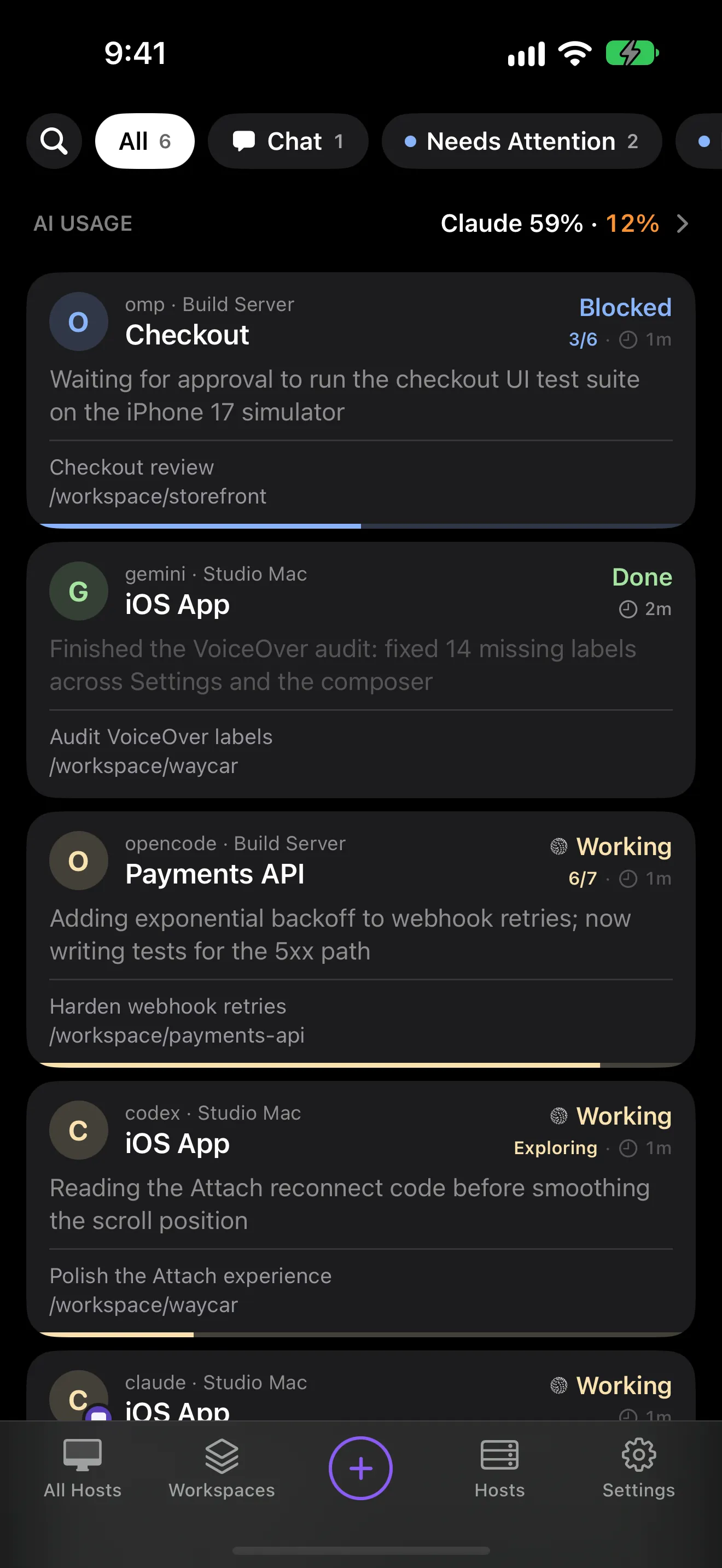
Agent Console on iPhone with an AI Usage row on top, then agents on two Hosts, each marked Blocked, Done, or Working with a one-line summary

Terminal

A real, native terminal.

Ghostty's engine: full-screen apps, momentum scrolling, selection, jump to live.

Prompting

Draft it first. Send once.

Edit before you send. On-device dictation (iOS 26), snippets and Skills.

Workspaces

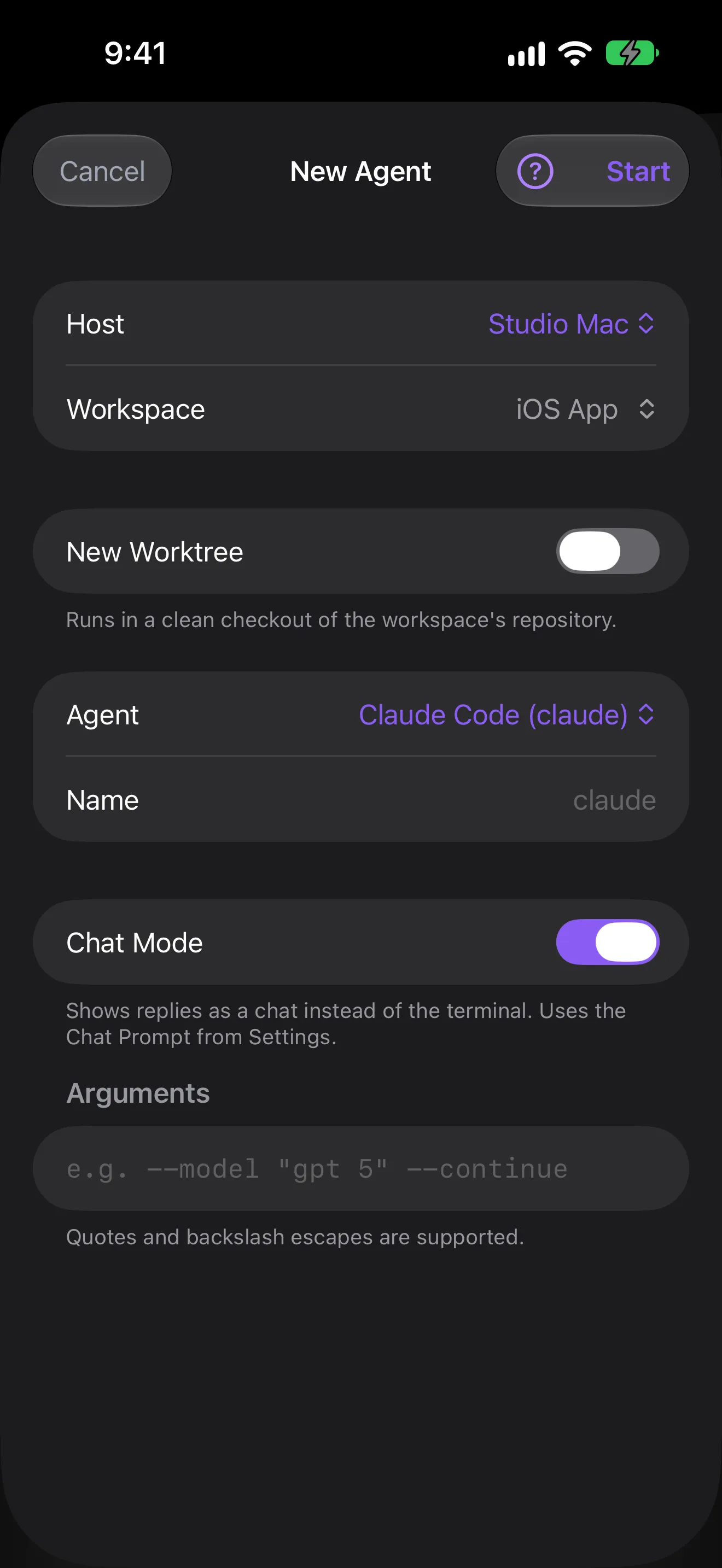
Start an agent on a clean worktree.

A fresh git checkout on its own branch, or any folder.

Connect

Pair a machine with one QR.

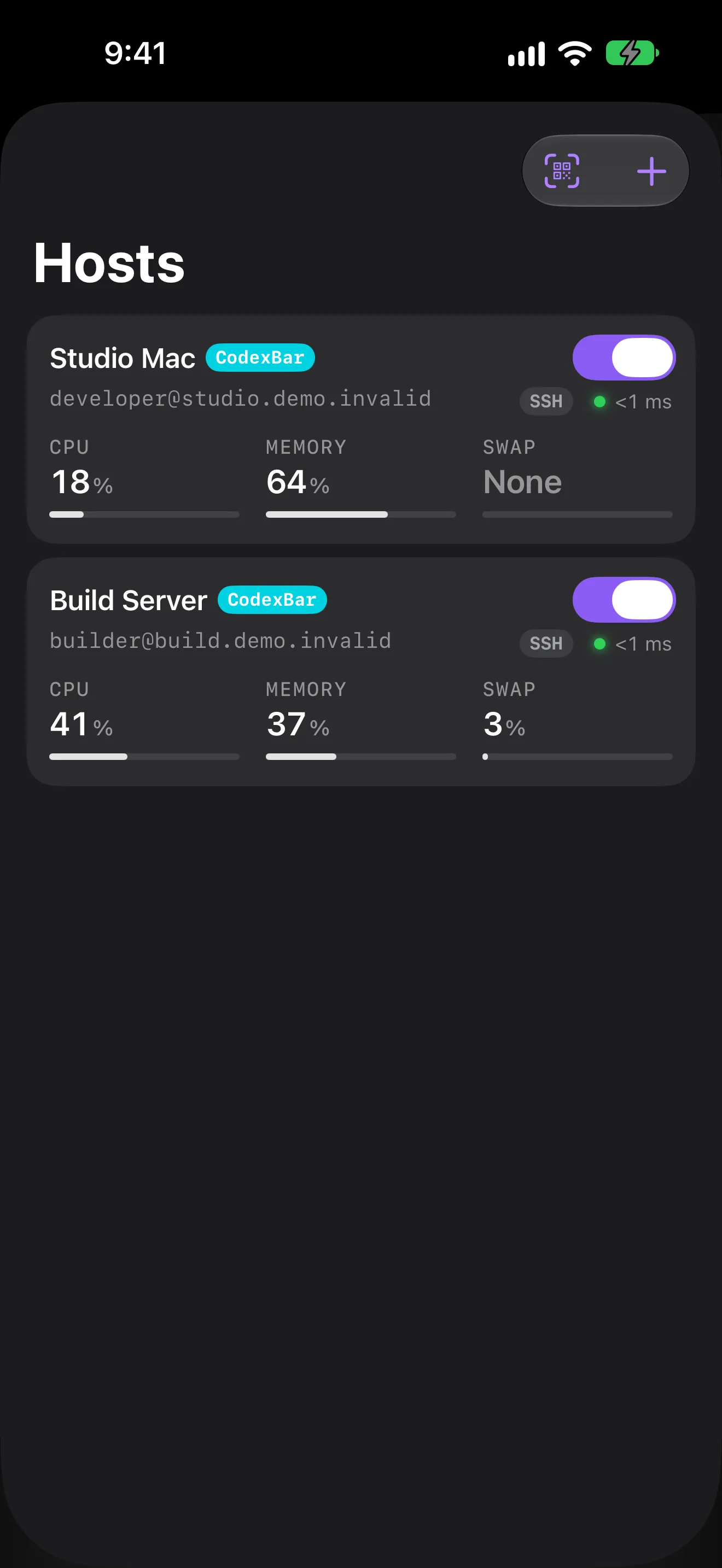
Keys made on device. The Pairing Code pins the host key. The Hosts sheet shows live CPU and memory.

iPad

A first-class iPad app, keyboard and all.

Sidebar, Stage Manager, Take Over Here, drag and drop, shortcuts. See the iPad gallery →

⌘1–9agents⌘[ ⌘]switch⌘Fsearch⌘Nnew agent⌘Einput mode⌘↩send
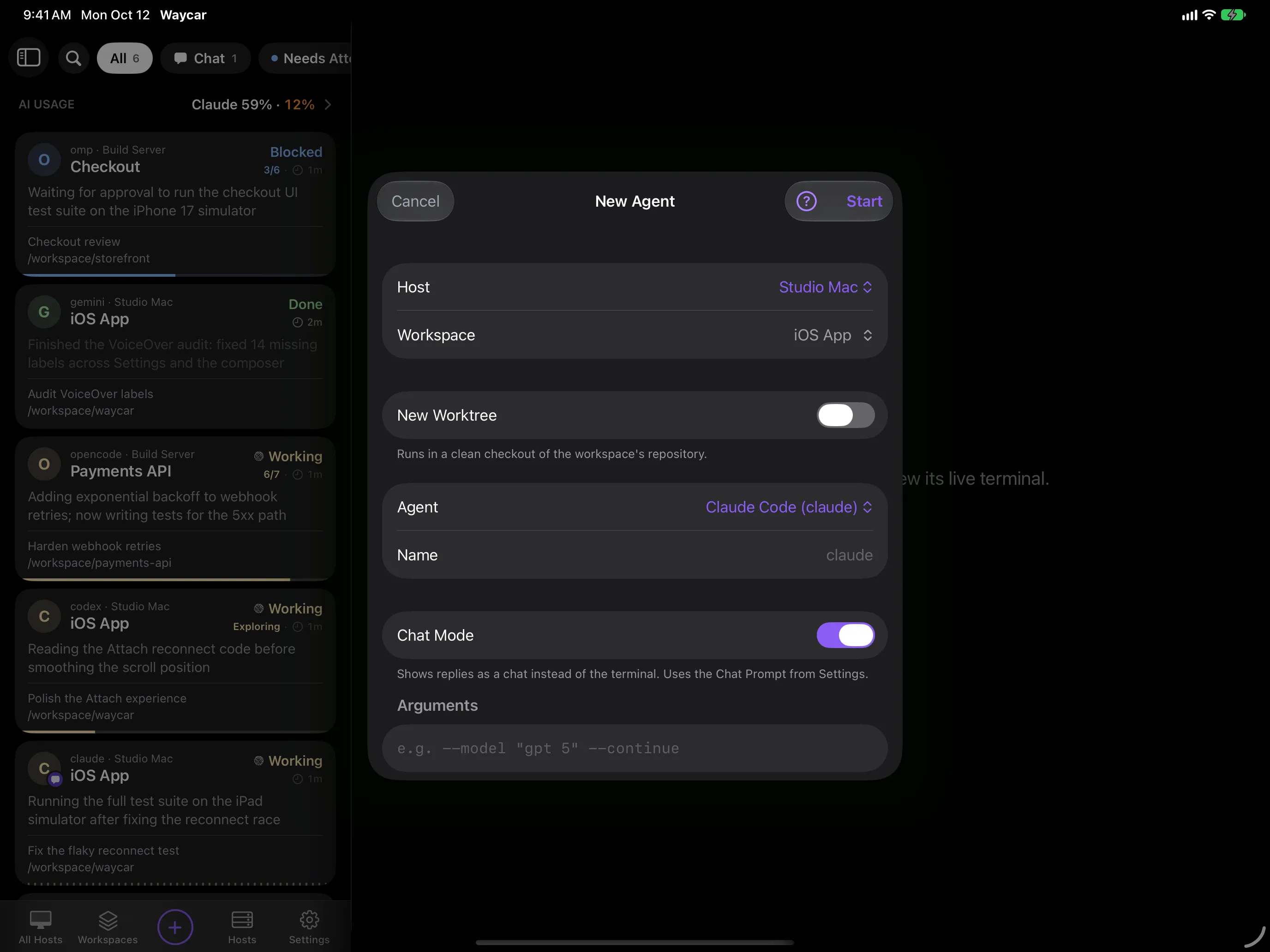
New Agent sheet on iPad over the Agent Console, with Host, Workspace, New Worktree, Agent, and Arguments fields

Notifications

Know the moment an agent blocks.

Encrypted pushes for Blocked and Done. A Live Activity for each Host.

Preview bar

Everything it prints, one tap away.

Images, PDFs, Markdown and links, in one bar under the terminal. Send it screenshots and files too, up to 64 MB.

Controls

Every key an agent can ask for.

Esc, Tab, arrows, Ctrl and F-keys, or type straight in. Make it your own.

Appearance

30 terminal themes. One for light mode, one for dark.

Two built-in fonts and pinch to zoom. Settings sync via iCloud Keychain.

Agents

Bring the agents you already run.

Waycar finds them on each Host. Shells show up too.

  • claude
  • codex
  • omp
  • gemini
  • opencode
  • pi
  • Amp
  • Antigravity
  • Cline
  • Cursor Agent
  • Devin CLI
  • Droid
  • GitHub Copilot CLI
  • Grok Build
  • Hermes Agent
  • Kilo Code
  • Kimi CLI
  • Kiro CLI
  • Maki
  • Mastra Code
  • Muse
  • Qoder CLI
  • Qwen Code
Security & privacy

Your keys. Your machines. Nobody else's servers.

The app has no account and no ads. Your keys and terminals never touch our servers. Notifications are encrypted before they leave your Host. Read the privacy policy →

  • On-device keys

    The private key never leaves your Keychain.

  • Pinned fingerprints

    The Pairing Code verifies your first connection.

  • Checked at both hops

    Jump Host and machine are verified separately.

  • Post-quantum ready

    Post-quantum key exchange when your server supports it.

  • On-device dictation

    Speech becomes text on your phone.

  • Encrypted sync

    Hosts and keys sync via end-to-end encrypted iCloud Keychain. Optional.

Setup

Get the app. Run one command. Scan.

  1. Get Waycar

    Get Waycar

    Get Waycar

    • iPhone and iPad

      Show QR codeHide QR code
      Scan with your iPhone or iPad
    • Android™,

      Coming soon

    Close
  2. Install on your Mac or Linux box

    Works with herdr, tmux, or both.

  3. Scan the code

    Say yes to show a QR, then scan it in Waycar. Run it again to pair another device.

  • iOS / iPadOS 18+
  • Android: coming soon
  • herdr ≥ 0.7.5
  • or tmux ≥ 3.2
  • No Node needed on the Host
  • OpenSSH · streamlocal on, for herdr
  • macOS: Remote Login on
  • mosh-server + UDP, for mosh
you@studio-mac — zsh
Command to install Waycar for herdr or tmux
curl -fsSL https://waycar.dev/install.sh | sh# answer Y to show a pairing QR
FAQ

Before you ask.

How do I get Waycar?
Download it on the App Store, then run the install command on each machine, or add one by hand.
What does Waycar cost?
Free for 10 Launches (new agents or shells, and resumed agents) every 30 days. Watching running agents never counts. Waycar Pro removes the limit for $5 a month or $40 a year in the US, and renews until you cancel in your Apple Account.
Do I need herdr?
No. tmux 3.2 or later works too.
Which agents work in Chat Mode?
Claude Code, Codex, omp, pi and opencode. Run the install command again first.
Does anything go through the cloud?
Not your sessions: they go over SSH straight to your machine. Push notifications and usage analytics are optional. AI Summaries, if you turn them on, send recent screen text to your AI provider.
My machine isn't reachable from the internet. Can I still use it?
Yes. Put an SSH Jump Host in front of it.
Is Waycar affiliated with herdr or the AI companies?
No. Waycar is an independent app from OTREVA, LLC.
Is there an Android app?
Not yet: Android is coming next. Waycar is on iPhone and iPad today.

Ride at the back.
See the whole train.

A waycar is the caboose: the last car, keeping watch over the whole train.

Get Waycar

Get Waycar

  • iPhone and iPad

    Show QR codeHide QR code
    Scan with your iPhone or iPad
  • Android™,

    Coming soon

Close
What's herdr? ↗